See where students live
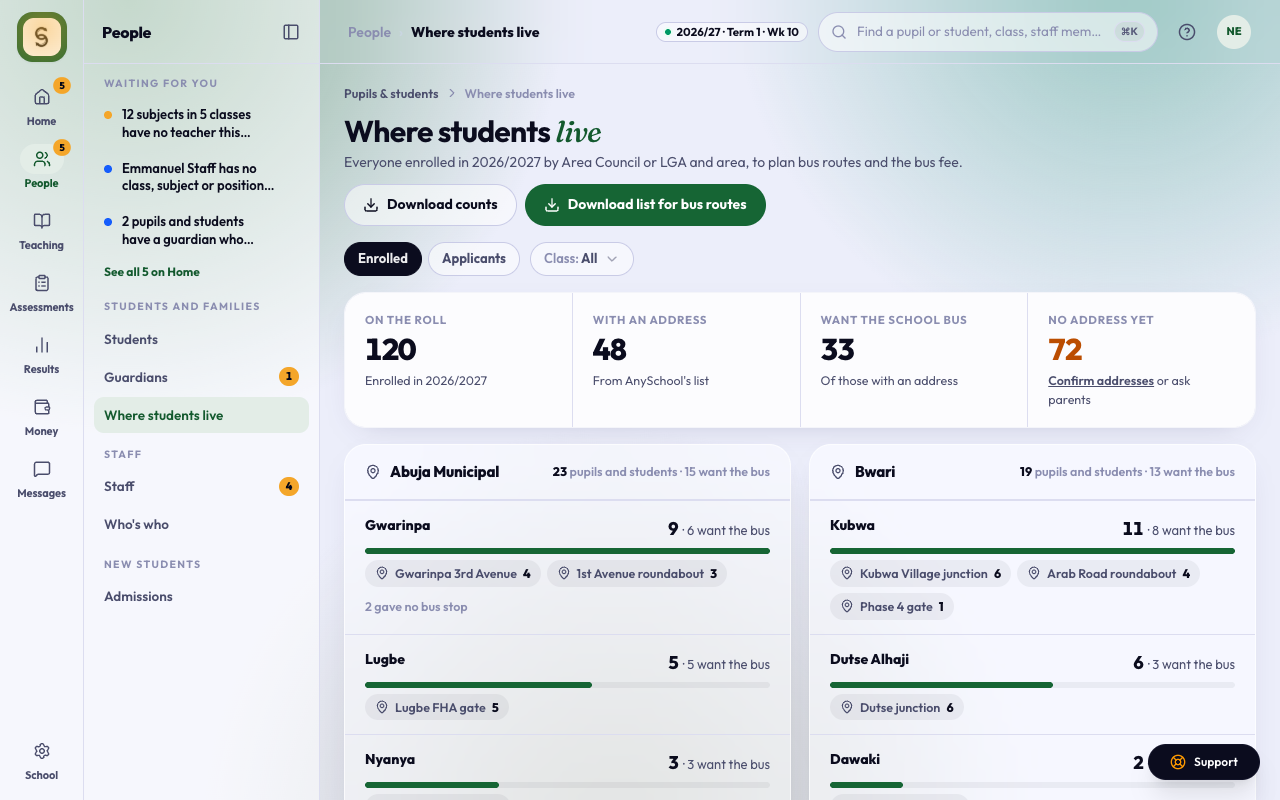
Open Students, then Where they live. The board and the Executive find it in the People space as Where students live.
The page counts everyone enrolled this session by Area Council or LGA, then by area, then by bus stop. Each line also says how many want the school bus, so you can plan bus routes and the bus fee.
- Class: count one class only.
- Applicants: count open applications instead, from the address on the form, to plan next session’s routes. Declined, lapsed and enrolled applications are left out.
Bus stops typed differently by different parents, such as “Kubwa junction” and “kubwa Junction”, count as one.
Each branch is its own school, so the page shows the branch you’re in.
Students with no address yet
The No address yet tile counts students whose address isn’t on AnySchool’s list of areas yet. To fill them in:
- Add the address on the student’s profile.
- Use Confirm addresses to check the area AnySchool suggested for an old typed address.
- Ask parents to add or confirm theirs in the parent portal.
Download the numbers
- Download counts gives a spreadsheet (CSV) with one row per bus stop: state, LGA, area, bus stop, how many students and how many want the bus.
- Download list for bus routes adds each student’s name, class, bus stop and a guardian’s phone number, for the driver or the transport officer.
Only staff who can see students get the list with names and phone numbers. Staff who see only fees or the school summary, such as the board and the Executive, see the counts and can download them, but never names.