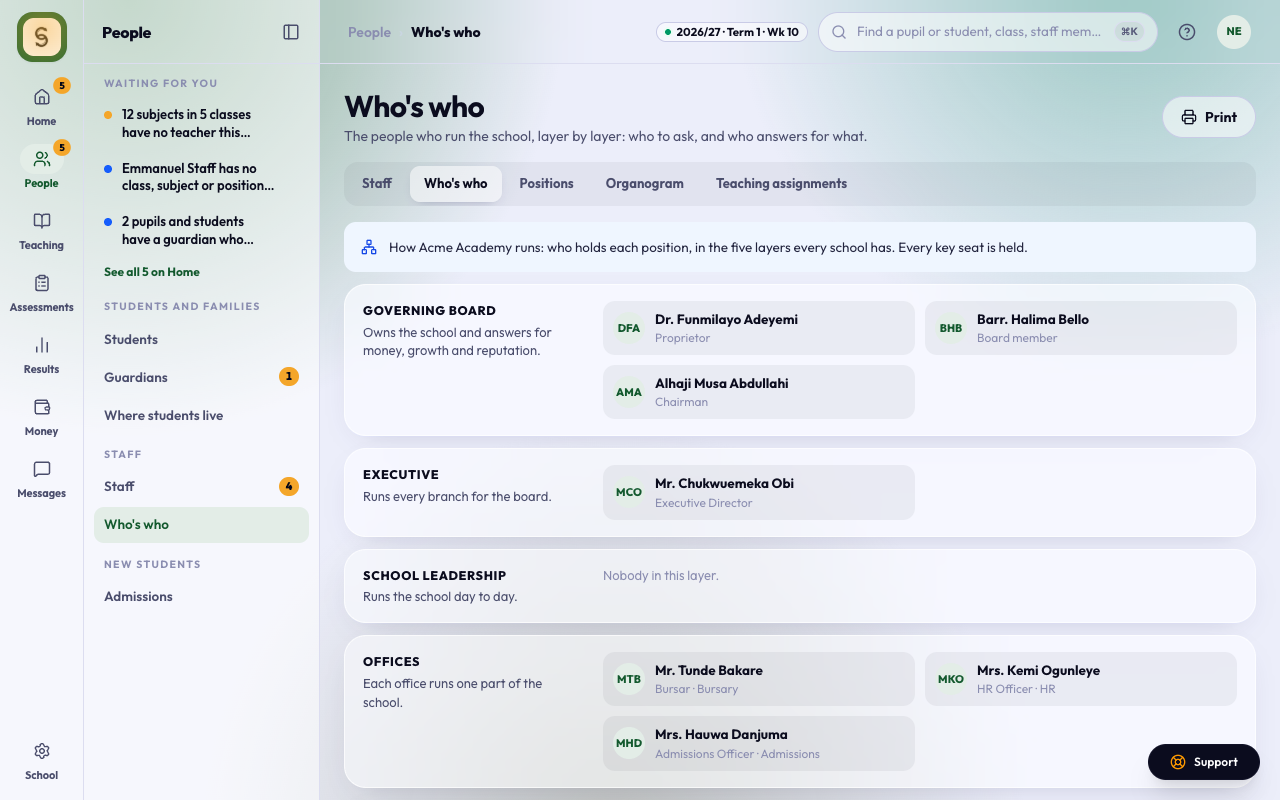
Who’s who shows the people who run your school, so you know who the Bursar is, who approves results and whom to ask. Every member of staff can open it: it’s a tab of Staff, or its own row in the menu if you don’t manage staff.
The five layers
Every school is run in five layers, and each position sits in one of them:
- Governing Board: the Proprietor, the Chairman and board members. They own the school and answer for money, growth and reputation.
- Executive: the Executive Director, who runs every branch for the board.
- School Leadership: the Principal, Vice Principals and Heads of Section, who run the school day to day.
- Offices: the Bursary, HR, Admissions, Exams and ICT. Each runs one part of the school.
- Teaching: class and subject teachers. The page shows how many there are; the full list is under Staff.
Each person shows with their position, and the section or office they hold it in. Someone acting in a position shows as Acting.
Gaps
A key seat nobody holds is flagged:
- no Principal;
- no Bursar, when your school uses Fees;
- nobody on the Governing Board;
- an office with nobody in it, such as no Exam Officer.
If you manage positions, each gap has Give the position, which opens Positions. Give someone the position from their profile under Staff. If you don’t, ask your Head of ICT when something here is wrong.
Home’s set-up list has a step, Who runs your school, which ticks itself once the Principal, the Bursar (with Fees on) and someone on the Governing Board hold their positions.
Print it
Press Print for a one-page map of who’s who for the staff room.